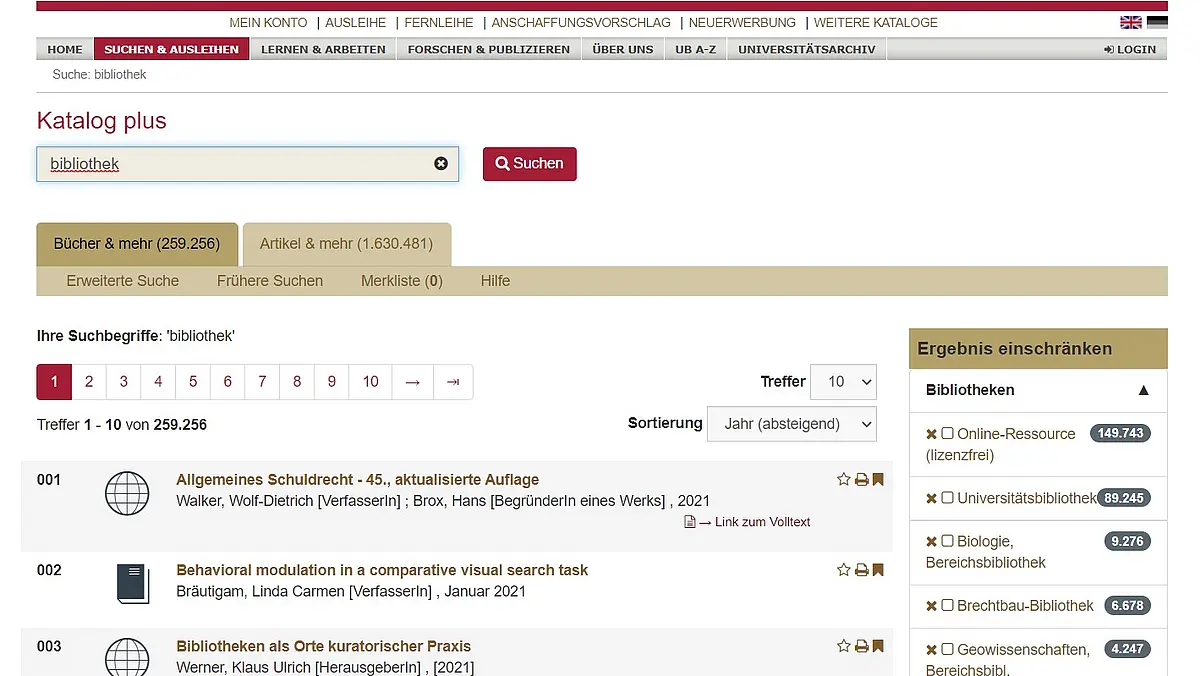
The hit list displays the short title view for your search terms. Please click on the title to see bibliographic and content details, as well as availability of the item.
If you are not logged in, some of the titles will only show "for registered users only ... (please login)".
Please do so by using your university login if you are a member of the university (student, employee) or your library card ID if you are an external member of the library.
Sorting the hit list:
The list of hits displayed in the "Books & more" section is sorted by default in descending order by year of publication, but can also be sorted in ascending or alphabetical order by title and by relevance (Hits in which the search term appears in the title, for example, are "more relevant" than those in which it appears in the publisher's name).
The hit list within the section "Articles & more" is usually sorted by relevance and can be subsequently re-sorted chronologically (descending by publication year).
Print titles or add them to my list:
Several fuctions are available in the hit list (in both the short title display as well as in the full title display): add title to my list, bookmark or print a title.
- Add the title to my list:
Click on this button to save the title to a list in order to use the data later on. If you are logged in, the list will be available for a longer period of time. - Print:
Here the title details will be displayed in a graphic version suitable for printing.